
There's no single cheapest way to pay for AI coding. A flat plan wins for interactive work. Anything that runs without you, like CI, scheduled agents or shared bots, belongs on API billing anyway. A local model on a 24 GB GPU is good enough for routine, private work. It won't handle your hardest tasks.
If that sounds simpler than what you've read, there's a reason. Headlines like "$200 subscription vs $7,470 of API usage" (a Reddit thread title quoted in CloudZero's Claude pricing guide) and dozens of "Claude Code pricing 2026" guides contradict each other. Plans, caps and credits changed again this year, so most of those numbers are stale.
Below, we explain the three ways to pay, work out a monthly bill for three profiles (a weekend hacker, a daily solo developer and a team with CI agents), and tell you when to switch. Every price comes from the vendors' own pricing and help pages as of November 2026. Where we estimate token use, we say so and show the math.
How flat plans and their caps actually work
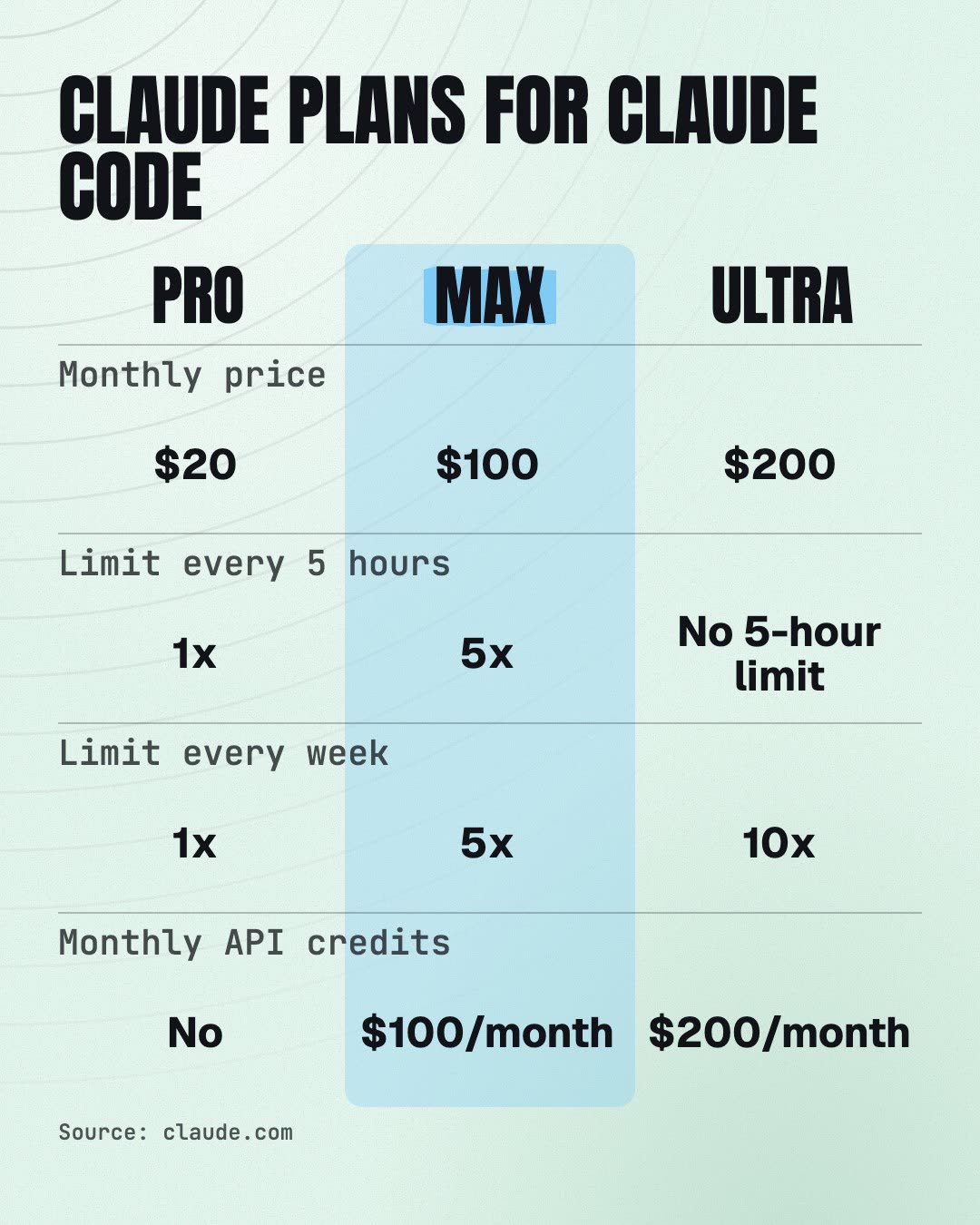
Claude has three individual tiers on its pricing page:
- Pro: $20 a month billed monthly, or $17 a month on the annual plan ($200 up front).
- Max: $100 a month for 5x Pro usage every five hours and every week, plus $100 a month in API credits.
- Ultra: $200 a month for 10x Pro weekly usage, no 5-hour limit for verified accounts, and $200 a month in API credits.
Pro and Max have two limits: a five-hour session limit and a weekly limit. Ultra only has the weekly one. Per the Claude Help Center, these limits are shared across Claude and Claude Code. So a long chat on your phone eats into your coding budget. How fast you hit a limit depends on the model, the length of your chats and the size of your files.
When you hit the cap partway through a response, Claude Code may keep going briefly to finish the current step. After that, you either wait for the reset or turn on usage credits, which let you keep working past the limit. You can cap those credits with a monthly spend limit. Set that limit before you need it.
Codex works in a similar way. It comes with ChatGPT plans, and according to OpenAI's Codex pricing, Pro plans currently have no five-hour limit. Plus and Pro users can buy credits when they hit the limit, and anyone can run extra local chats with an API key at standard API rates.
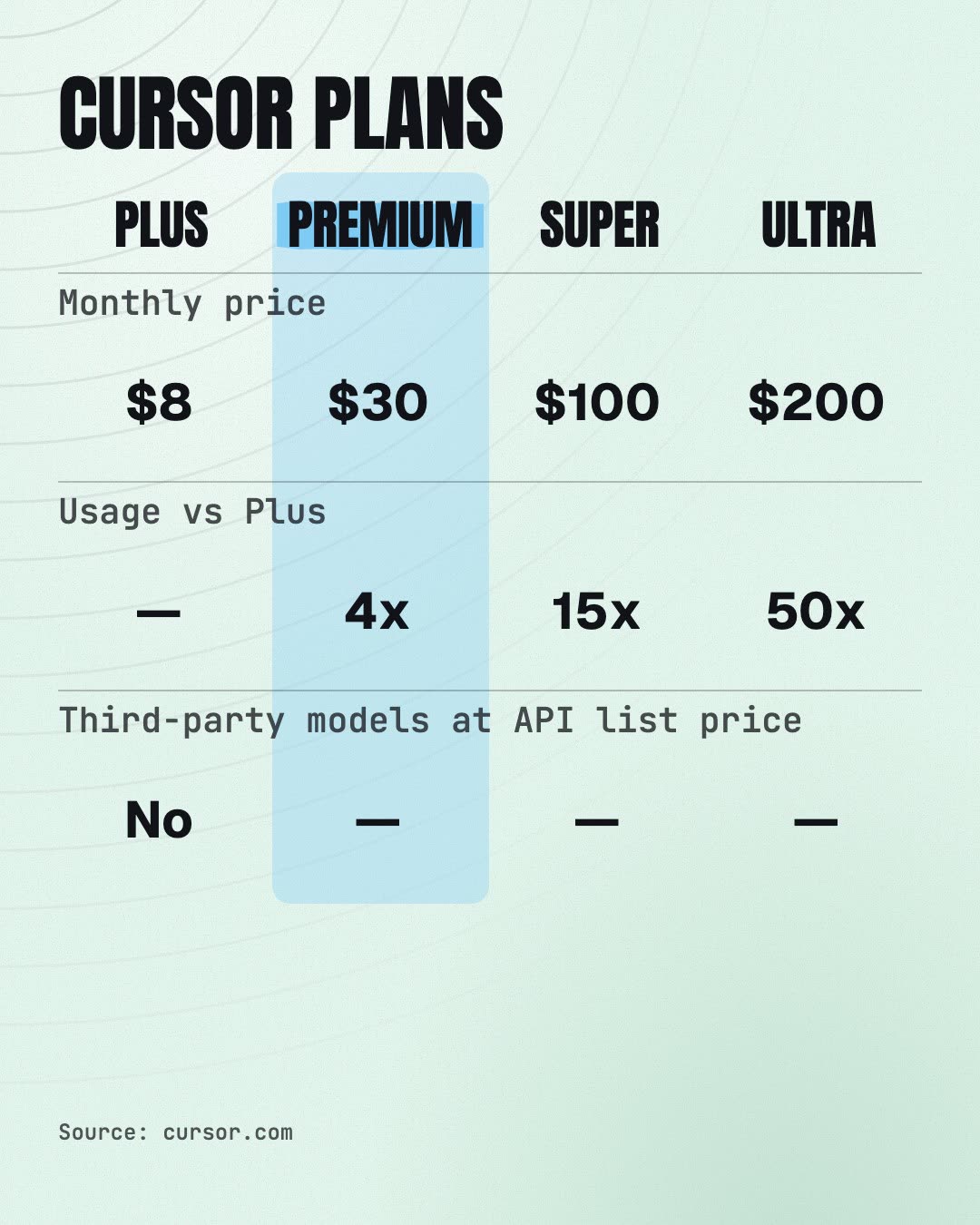
Cursor's pricing page now lists Free, Plus at $8, Premium at $30 (4x Plus usage), Super at $100 (15x) and Ultra at $200 (50x). Plus only gives you Grok models. Third-party models such as Claude and GPT aren't included in any plan price and are billed separately at API list price. So if you want Claude or GPT inside Cursor, the plan doesn't replace an API bill.
How API billing works, and the levers that cut it
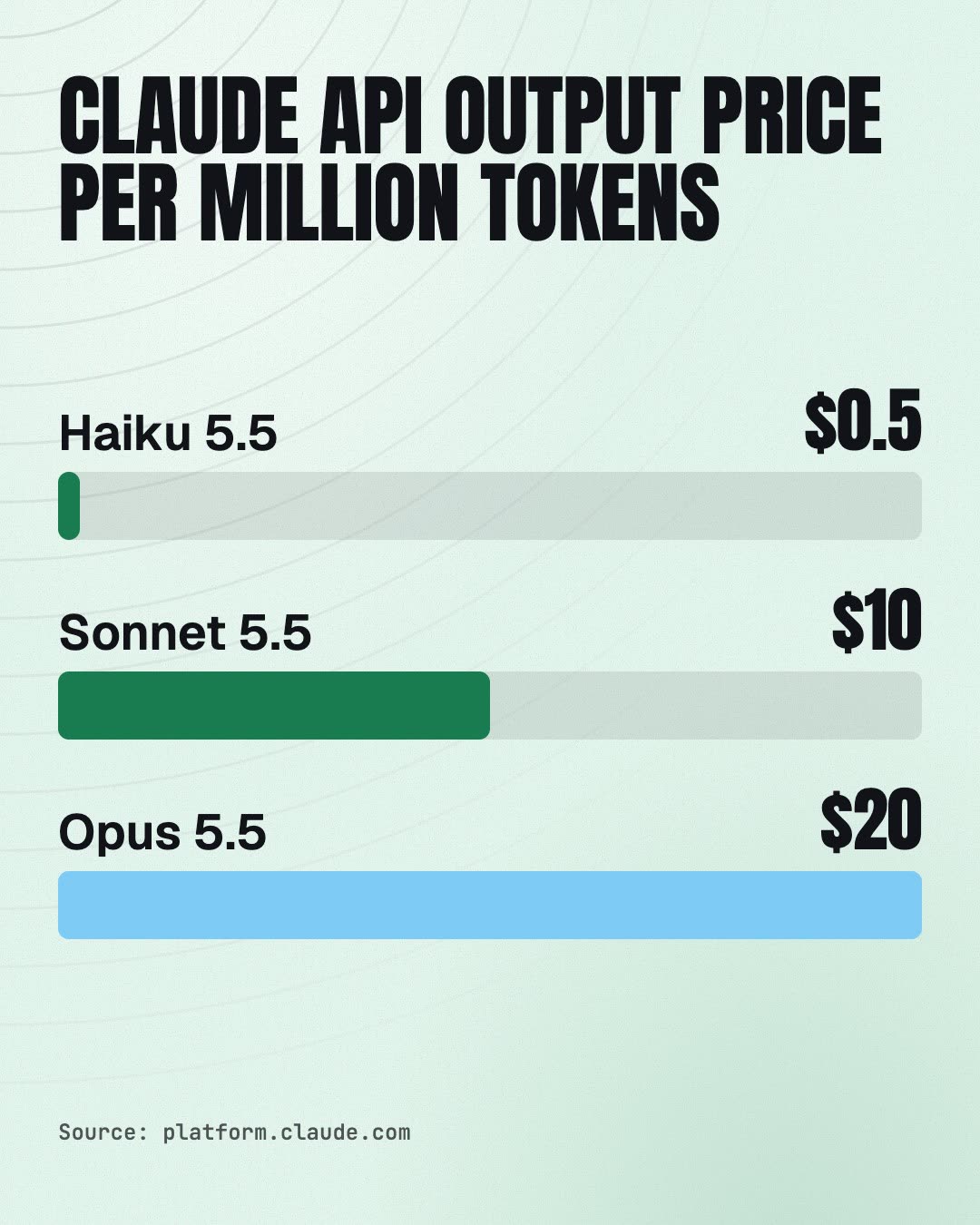
With the API, you pay per million tokens (MTok) of input and output. Current Claude list prices: Sonnet 5.5 costs $2 input and $10 output, and Opus 5.5 costs $4 and $20. Haiku 5.5 is the cheap option for small jobs.
Three levers matter most:
- Prompt caching. Coding agents resend the same files and history every turn. On Opus 5.5 and Sonnet 5.5, a cache hit costs 5% of the normal input price.
- Batch API. It gives 50% off both input and output tokens for jobs that can wait, like nightly reviews or test suggestions.
- Model choice. Per Anthropic's costs page, cost scales with context size, and the model sets the rate: Opus costs twice as much as Sonnet for both input and output.
One catch: Claude 4.7 and later models use a tokenizer that produces about 30% more tokens for the same text. Per-task estimates made on older models will come out too low.
For a baseline, Anthropic publishes its own numbers. Across enterprise deployments, Claude Code averages about $13 per developer per active day and $150–250 per developer per month, and 90% of users stay below $30 per active day. Run /usage in Claude Code to see your own number before you decide anything. It calculates the dollar figure at list price.
The math: three profiles, three bills
Our assumptions: we use Anthropic's published $13 average and $30 high-end daily figures, which are averages across enterprise deployments. We assume they're close to what you'd pay per token yourself. These are estimates, not quotes. Your own /usage number will tell you which end of the range you're on.
Weekend hacker: about 8 active days a month
At those figures, that's 8 × $13 ≈ $104 on an average month and up to 8 × $30 = $240 on heavy ones. Pro at $20 handles light sessions. What it really costs you is waiting for the five-hour reset. Our verdict: go with Pro, and turn on usage credits with a low spend limit for the occasional long Saturday.
Daily solo developer: about 21 active days
Paid per token, that's 21 × $13 ≈ $273 at the average and up to 21 × $30 = $630 at the 90th-percentile ceiling. Max at $100 or Ultra at $200 is a flat price, but the pricing page only promises 5x or 10x Pro usage, with usage limits, and doesn't say how much list-price usage that covers. Our assumption is that $273–630 of work fits inside those caps; a week of /usage will show whether yours does. Pick Ultra if the five-hour limit keeps stopping you mid-task. Pick Max if you mostly hit the weekly ceiling late in the week. Our verdict: at this volume, if your work fits inside the caps, a flat plan is cheaper than tokens for interactive work.
Team of five with CI agents
Each developer gets their own plan for interactive work. The CI bill comes on top, because shared automation should run on an API key (more on that below). Here's an illustrative example: a PR review that reads 200k input tokens and writes 10k output tokens on Sonnet 5.5 costs about $0.40 + $0.10 = $0.50 before caching. At 20 PRs a day over 21 working days, that comes to about $210 a month. Caching brings that down, and Batch pricing would cut it to about $105 for reviews that can wait.
What hitting the cap costs you depends on how you pay. On a plan, you pay in time spent waiting, or in usage credits at API rates. On the API, nothing stops you. That's exactly why you set workspace spend limits.
Why CI and scheduled agents belong on API billing
The Claude Code GitHub Action can sign in with either a subscription token or an API key. For a secret shared across repositories, though, Anthropic says to use a Console API key, because an OAuth token is tied to the subscription of the person who created it.
There's a second reason. Runs started by the GitHub Action count as Claude Code usage, so the Max and Ultra API credits don't cover them. If the Action runs on someone's personal token, every run draws from that person's plan limits. A busy pipeline can use up one developer's weekly limit and stall their day.
OpenAI says the same about Codex: API-key access is "great for automation in shared environments like CI". It's billed at API pricing and doesn't include cloud features.
When a local model on your own GPU is good enough
This setup is real and documented. Ollama supports a subset of the Anthropic Messages API, so you can point Claude Code at a local server.
Take Mistral's Devstral Small 2 as an example. It's a 24B model under Apache 2.0 with a 256k context window, and Mistral says it runs on a single RTX 4090 or a Mac with 32 GB RAM. Its model card lists 68.0% on SWE-bench Verified, against 77.2% for Claude Sonnet 4.5 in the same table. Keep in mind that Sonnet 4.5 is an older Claude model.
Where a local model fits well:
- Private code that can't leave the machine
- Offline work
- High-volume routine edits: boilerplate, tests, refactors
Once you own the hardware, each extra token costs nothing, and you never hit a five-hour cap. The limits are real, though. Ollama doesn't support prompt caching, tool_choice or the Batch API, and its token counts are approximations. Mistral itself advises switching to its API if local serving performs poorly. Expect more retries on hard multi-file tasks.
To be honest about it: a local model replaces the cheap part of your workload, not the hardest part. In our view, most developers who run one will still want a plan for the hard tasks.
Our pick, and a five-minute decision rule
- Run /usage or check your dashboard for a week.
- Multiply your active days by your daily spend at list price.
- If that comes out well above $100 and your week fits inside the plan's caps, a flat plan wins for interactive work. Choose Max if you rarely hit the five-hour limit, Ultra if you often do.
- Put every unattended job on an API key with a spend limit.
- Move routine or private tasks to a local model only if you already own a 24 GB GPU.
Here's what we'd recommend for a small team. Give each developer one flat plan for interactive coding. Set up a separate API workspace with a hard spend limit for CI and scheduled agents. Use cheaper models and Batch for jobs that can wait. Keep a local model as a backup for private or offline work.
Prices and plans change often, so check the official pages again before you buy. For more practical guides on AI coding workflows, head to /learn.