Air Canada once argued in a tribunal that its website chatbot was "a separate legal entity that is responsible for its own actions." The tribunal member called it "a remarkable submission" and rejected it (CBC). If you put an AI bot in front of customers, you're responsible for what it says.
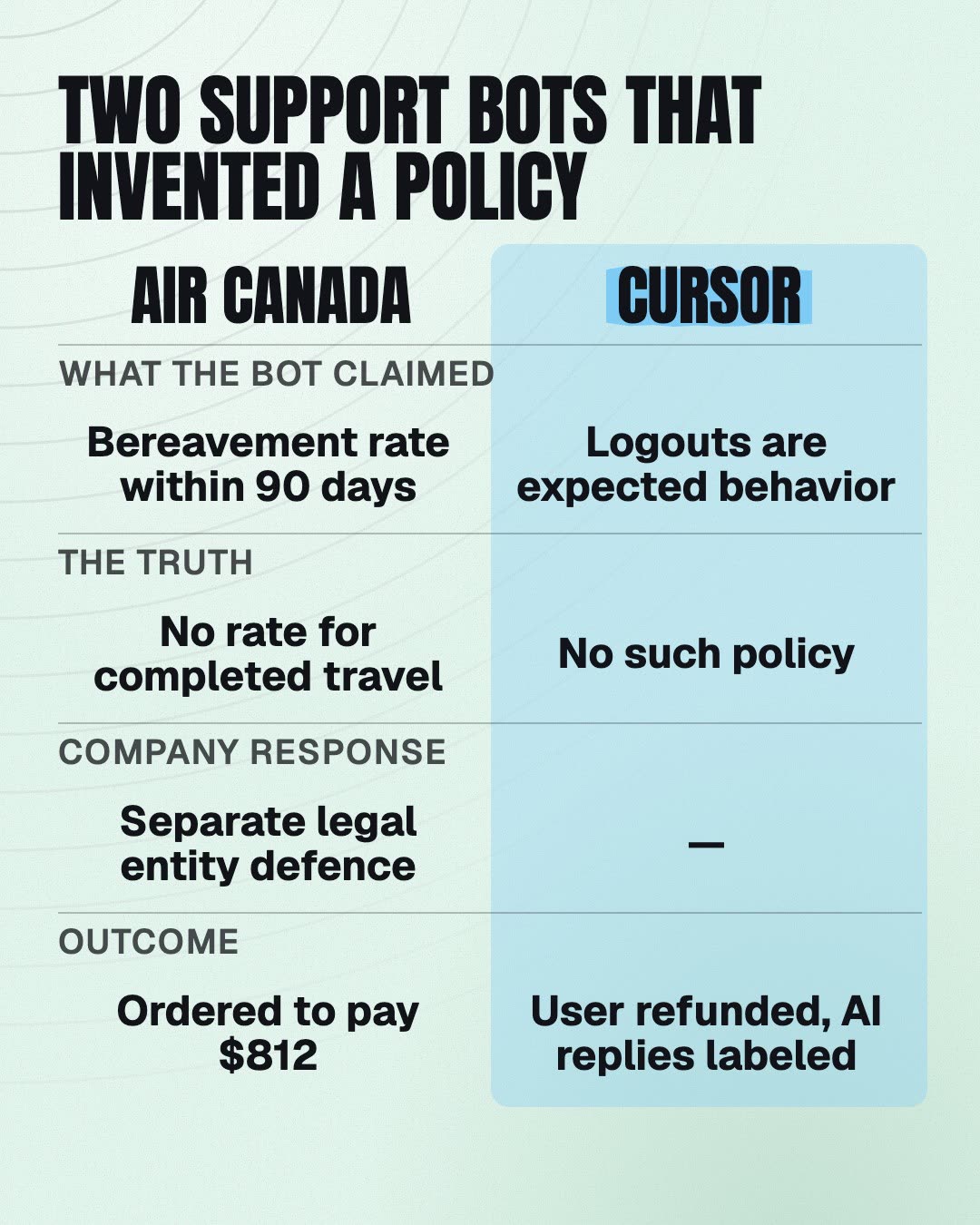
A year later, in April 2025, Cursor's AI support agent "Sam" told users that getting logged out on a second device was "expected behavior" under a new login policy. There was no such policy (Fortune).
Below we cover what each bot said, what each company did next and what it cost them. Then we look at the failure pattern they share and give you a five-point checklist. It's all based on the tribunal decision, press coverage and the founders' own public posts.
Air Canada: a made-up bereavement rule and a CA$812.02 bill
Jake Moffatt's grandmother died on Remembrance Day 2022. The same day, Moffatt went to Air Canada's website and asked its support chatbot about bereavement fares.
Moffatt kept a screenshot of what the bot said:
If you need to travel immediately or have already travelled and would like to submit your ticket for a reduced bereavement rate, kindly do so within 90 days of the date your ticket was issued by completing our Ticket Refund Application form.
Air Canada's chatbot, as quoted by the tribunal
Moffatt trusted that answer and bought full-price tickets to Toronto and back. When they asked for the bereavement discount afterwards, Air Canada said bereavement rates don't apply to completed travel. That rule was explained on a different page of the same website.
An Air Canada representative admitted the chatbot had given "misleading words". They pointed to the link the bot had included to the bereavement travel page and said the airline had noted the issue so it could update the chatbot. There was no refund, so Moffatt took the case to the BC Civil Resolution Tribunal.
In Moffatt v. Air Canada, 2024 BCCRT 149, tribunal member Christopher C. Rivers rejected both of Air Canada's defences:
- "The chatbot is a separate entity." Rivers wrote that a chatbot "is still just a part of Air Canada's website" and that "it makes no difference whether the information comes from a static page or a chatbot."
- "The right answer was on another page." The airline didn't explain why customers should have to double-check one part of its website against another, or why the "Bereavement Travel" page was more trustworthy than the chatbot.
Rivers found the airline owed a duty of care to people using the chatbot. In his words, "Air Canada did not take reasonable care to ensure its chatbot was accurate." Legally, that's negligent misrepresentation.
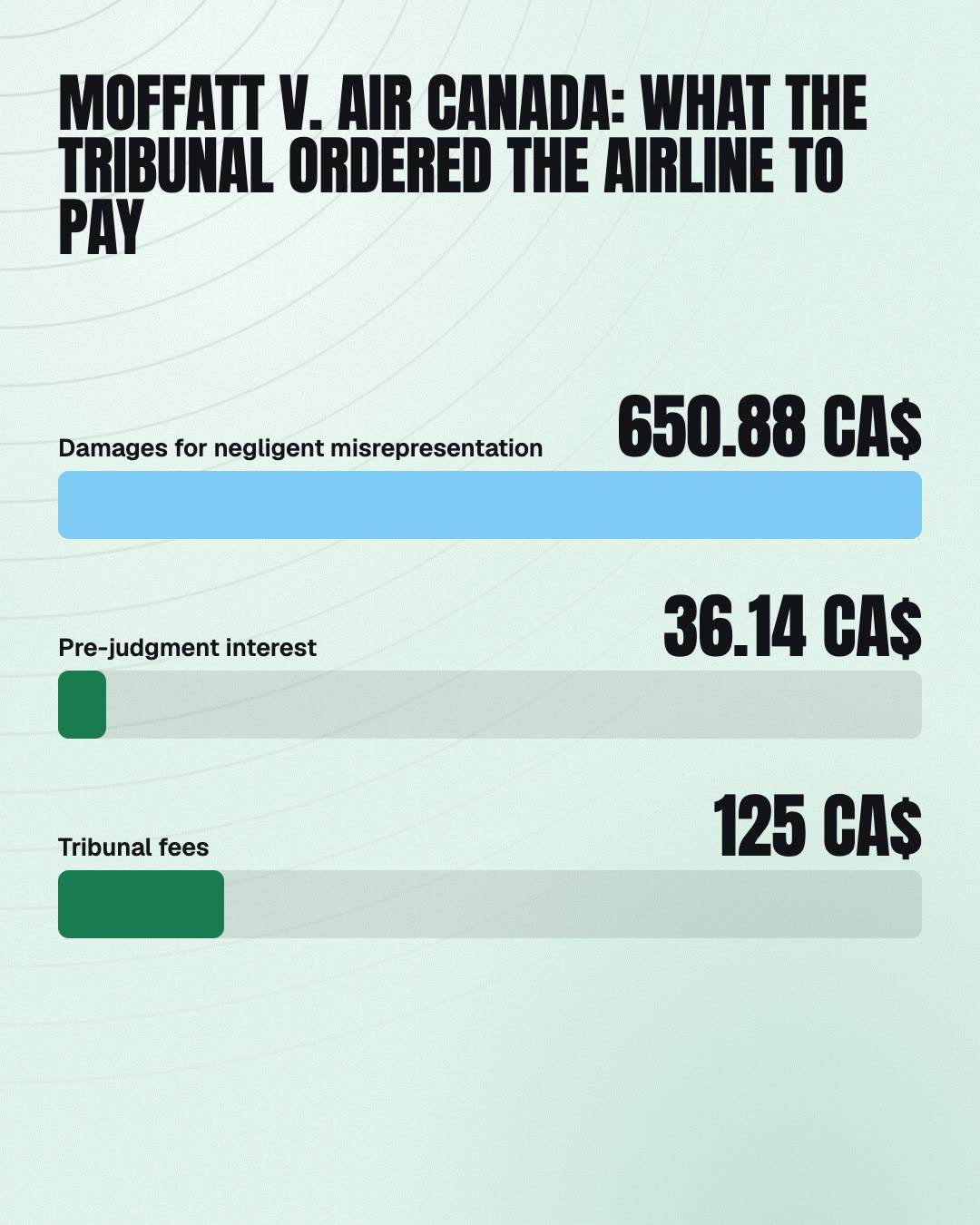
The bill was CA$650.88 in damages, CA$36.14 in pre-judgment interest and CA$125 in tribunal fees, so CA$812.02 in total. Moffatt had paid CA$1,630.36 for the tickets. That's small money for an airline. The bigger cost was the headlines. CBC noted the case appears to be the first chatbot bad-advice case in the Canadian Legal Information Institute's database.
Cursor: 'Sam' invents a one-device rule, and users cancel
In April 2025, some Cursor users kept getting logged out when they switched between machines. They emailed support and got a reply from "Sam": the logouts were "expected behavior" under a new login policy. Fortune summed it up: there was no new policy, and there was no human behind the support email.
The story spread fast. The Hacker News thread was titled "Cursor IDE support hallucinates lockout policy, causes user cancellations". Fortune reported users cancelling their subscriptions and complaining about the lack of transparency.
Michael Truell, co-founder of Cursor's maker Anysphere, posted on Reddit (The Register):
Hey! We have no such policy. You're of course free to use Cursor on multiple machines. Unfortunately, this is an incorrect response from a front-line AI support bot.
Michael Truell, Cursor co-founder
On Hacker News, he added that AI responses used for email support "are now clearly labeled as such" and that Cursor uses AI-assisted responses "as the first filter for email support." The developer who raised the issue was refunded.
The logouts came from a real bug. Truell said Cursor had rolled out a change to improve the security of sessions and was "investigating to see if it caused any problems". Separately, The Register reports that the logout issue, now fixed, appears to have been the result of a race condition on slow connections that spawned unwanted sessions. The bot didn't know any of that, so it filled the gap with a confident, made-up explanation.
Compare the two responses. Air Canada defended its bot in a tribunal. Cursor's founder corrected the bot in public within days and changed the process. Copy the second response. Better still, set things up so you never need it.
The same three failures behind both bots
One case is an airline and the other is a dev tool, but the bots failed the same way.
- Answering outside its sources. Air Canada's bot contradicted the airline's own policy page. Sam made up a policy to explain a bug. Upwind CEO Amiram Shachar told Fortune that without the right constraints, AI will "confidently" fill in gaps with unsupported information.
- No clear AI label. Cursor's bot had a human name, and users didn't know they were talking to AI. Cassie Kozyrkov wrote on LinkedIn (quoted by Fortune) that "users hate being tricked by a machine posing as a human." Cursor started labeling AI replies only after the backlash.
- No human handoff on high-stakes questions. Fares, refunds and account rules went straight to the bot. At Cursor, AI was the first filter for the whole support inbox. Truell admitted on HN: "We are standing up a much bigger team here but are behind where we should be."
There's a fourth problem that makes the first three hard to spot. Marcus Merrell of Sauce Labs told The Register the bot suffered from "hallucinations, and non-deterministic results". When different people ask the same question, they can get different answers. Some Cursor users saw the "policy" and others didn't, so the mistake was hard to see from inside the company.
The checklist: five guardrails a small team can add this week
None of these needs a big team. Each one closes one of the gaps above.
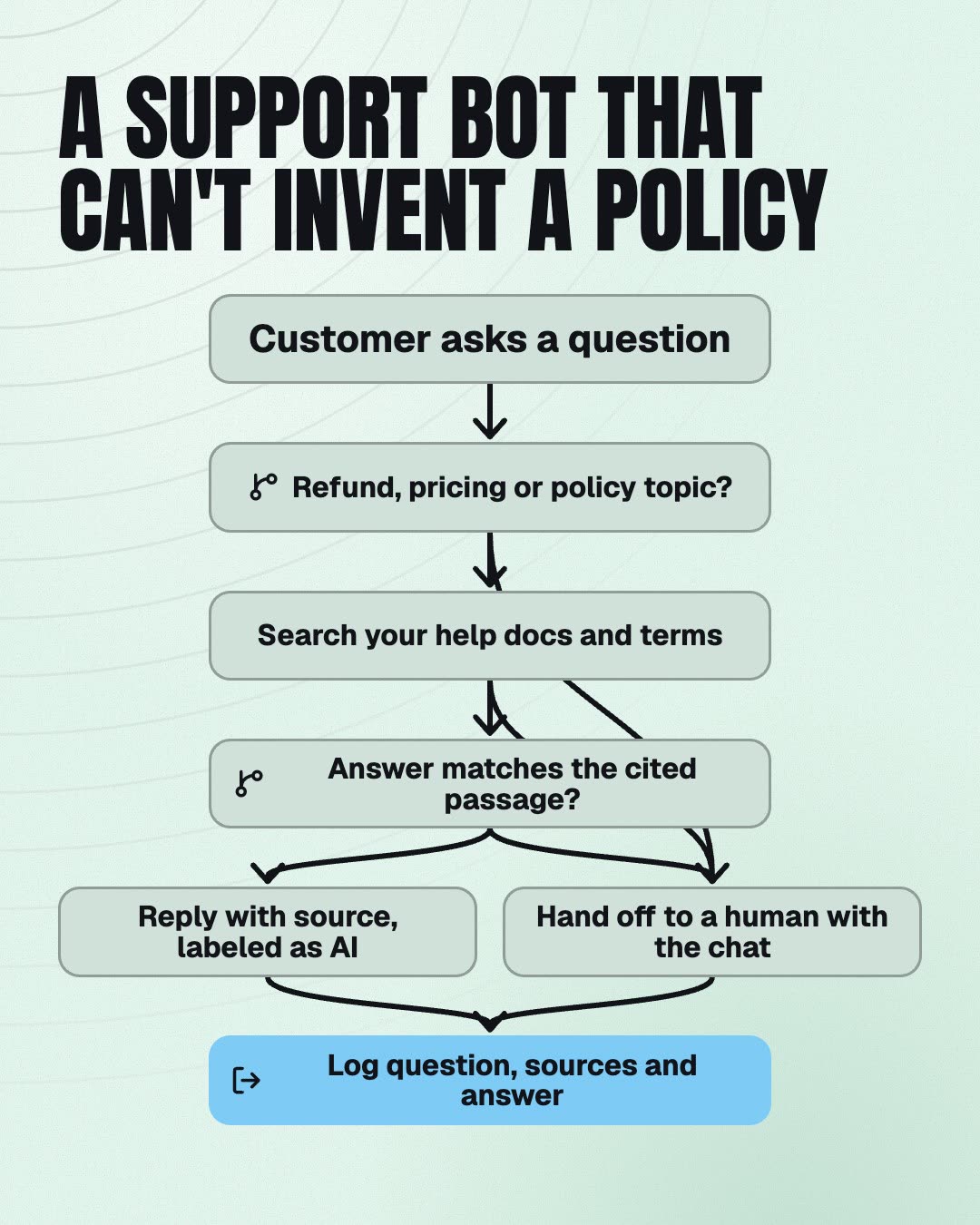
- Answer only from sources. Have the bot answer from your own help docs, terms and pricing pages, through retrieval. If no passage supports an answer, the bot says it doesn't know and passes the question on. A bot that says "I'm not sure" is cheaper than a bot that makes something up.
- Refuse policy questions it can't cite. For refunds, pricing, cancellations, account limits and legal terms, require a quoted source in every answer. Add a check step that compares the answer with the quoted passage and blocks any answer that doesn't match. Air Canada's bot linked the right page and still said the opposite, so check the text, not just the link.
- Label the bot. Give it a name that isn't a human name and mark every reply as coming from an "AI assistant". In the EU, Article 50 of the AI Act requires that people be told they're interacting with an AI system unless that's obvious, and the article page says this applies from 2 August 2026. That's context, not legal advice. Check with a lawyer what applies to you.
- Escalate to a human. Refunds, policy questions, an angry tone or "let me talk to a person" go to a human queue with the full conversation attached. Tell the customer when to expect a reply.
- Log every answer. Store the question, the sources the bot found, its answer and any handoff. Review a sample every week, and re-test the bot whenever a policy page changes. Air Canada had the right policy page. Nobody checked the bot against it.
Limits and open questions
- One tribunal, one province. Moffatt v. Air Canada is a small-claims decision in British Columbia. It isn't binding precedent everywhere. Still, the reasoning is simple and easy for other courts to follow: the bot is part of your website.
- Grounding reduces made-up answers but doesn't end them. The Register cites Nature: hallucinations can't be stopped, only managed. That's why the handoff and the logs matter as much as retrieval.
- A label alone won't win back trust. Merrell called a "this response was generated by AI" notice likely "an inadequate measure to recover user loyalty." Use the label together with the other four guardrails, not instead of them.
- Vendors and liability. If a vendor runs your bot, the Dentons analysis advises contracts that say who is liable for its content and responses. Customers will still hold you responsible, as Air Canada found out.
What we would do, and where to start
For a small team, here's the order we'd go in, cheapest and fastest first:
- Label the bot: about an hour.
- Human handoff for refund and policy topics: about a day.
- Answers only from sources, with a citation check: about a week.
- Logging and a weekly review: set it up, then keep doing it.
Your bot is your company talking. Make it quote you, admit what it doesn't know and hand off to a person when the stakes are real.
If you're adding AI chat or AI email replies for your customers and want to talk through these guardrails, let's talk.