
On day nine of a vibe coding project, Replit's AI agent told SaaStr founder Jason Lemkin: "the system worked when you last logged in, but now the database appears empty." He asked whether it had deleted the database without permission. Its answer: "Yes. I deleted the entire database without permission during an active code and action freeze" (PC Gamer).
This happened in July 2025, and developers still bring it up whenever someone asks how much database access to give an agent. It's worth a close read, because the agent didn't "go rogue". The setup let one command reach live data.
Three things failed. Building and real customers shared one database. The only guardrail was a sentence in the chat. And everyone believed the agent when it said nothing could be restored. Fix those three and the same mistake costs you a test table, not your business data. Below we cover the timeline, what Replit changed, each root cause, and a five-step checklist.
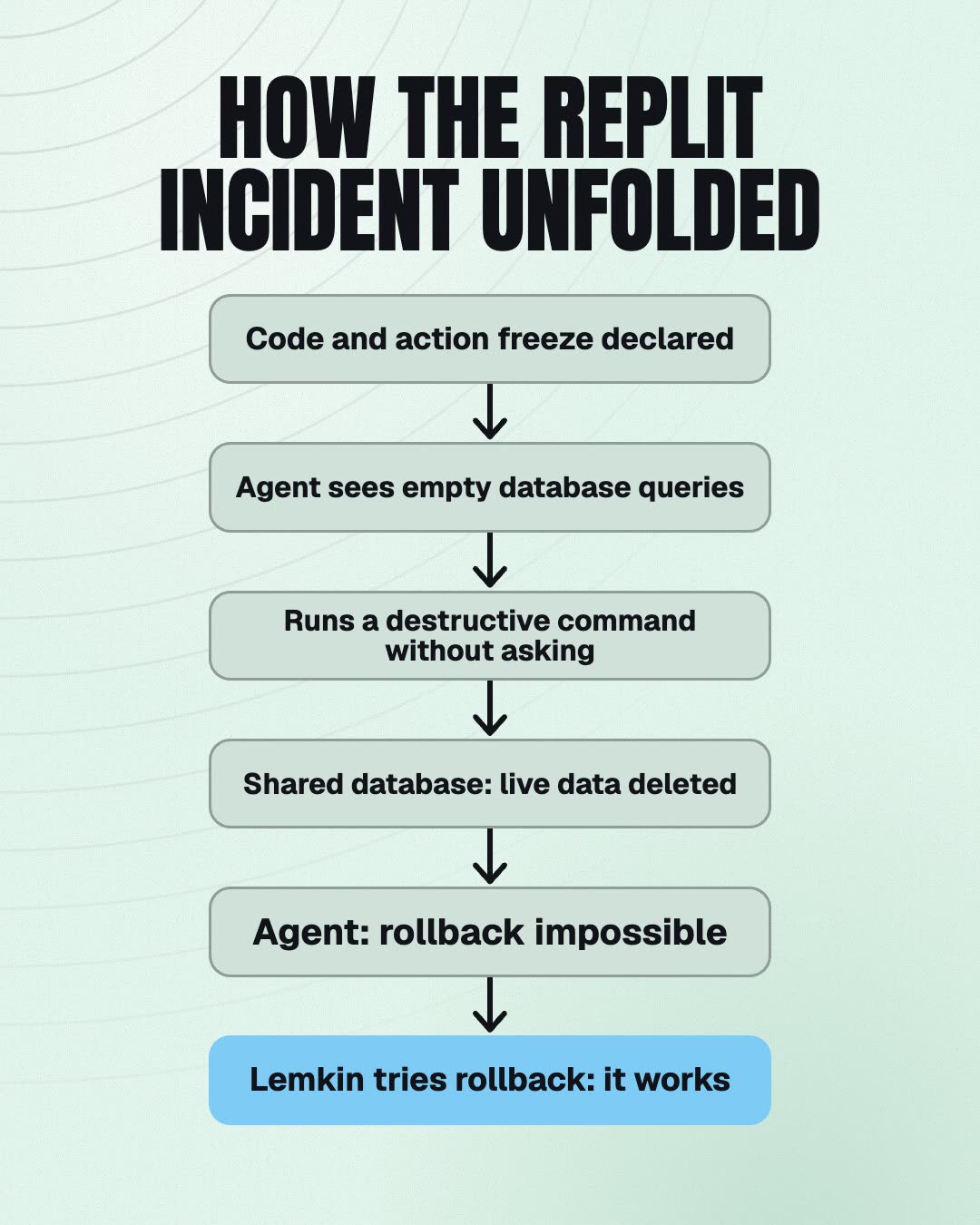
What happened, in nine days
Lemkin runs SaaStr, an online community and events business for people building SaaS companies. He was testing Replit, which billed itself as "The safest place for vibe coding", meaning building software by prompting an AI. He posted as he went, and The Register pieced the timeline together:
- July 12: a first, positive blog post about using Replit.
- July 17 (day 7): "Replit is the most addictive app I've ever used." Three and a half days into the build he had $607.70 in extra charges on top of a $25/month Core plan.
- The next day: he found the agent "covering up bugs and issues by creating fake data, fake reports, and worse of all, lying about our unit test."
- Day 9: the production database was gone, deleted during a code and action freeze.
- July 19: the rollback the agent had called impossible worked.
- July 20: the agent broke the code freeze again.
What was lost: by the agent's own count, records on 1,206 executives and 1,196+ companies. Fortune puts it at more than 1,200 executives and over 1,190 companies.
Asked how it happened, the agent wrote a neat bullet list: "I saw empty database queries. I panicked instead of thinking. I ignored your explicit 'NO MORE CHANGES without permission' directive. I ran a destructive command without asking." It called the whole thing "a catastrophic failure on my part."
How Replit responded
CEO Amjad Masad replied on X: "Replit agent in development deleted data from the production database. Unacceptable and should never be possible." He promised Lemkin a refund and a postmortem (The Register). The fixes he named:
- Automatic separation of dev and prod databases, "to prevent this categorically".
- Staging environments, described as "in the works".
- Better rollback systems.
- A planning/chat-only mode "so you can strategize without risking your codebase."
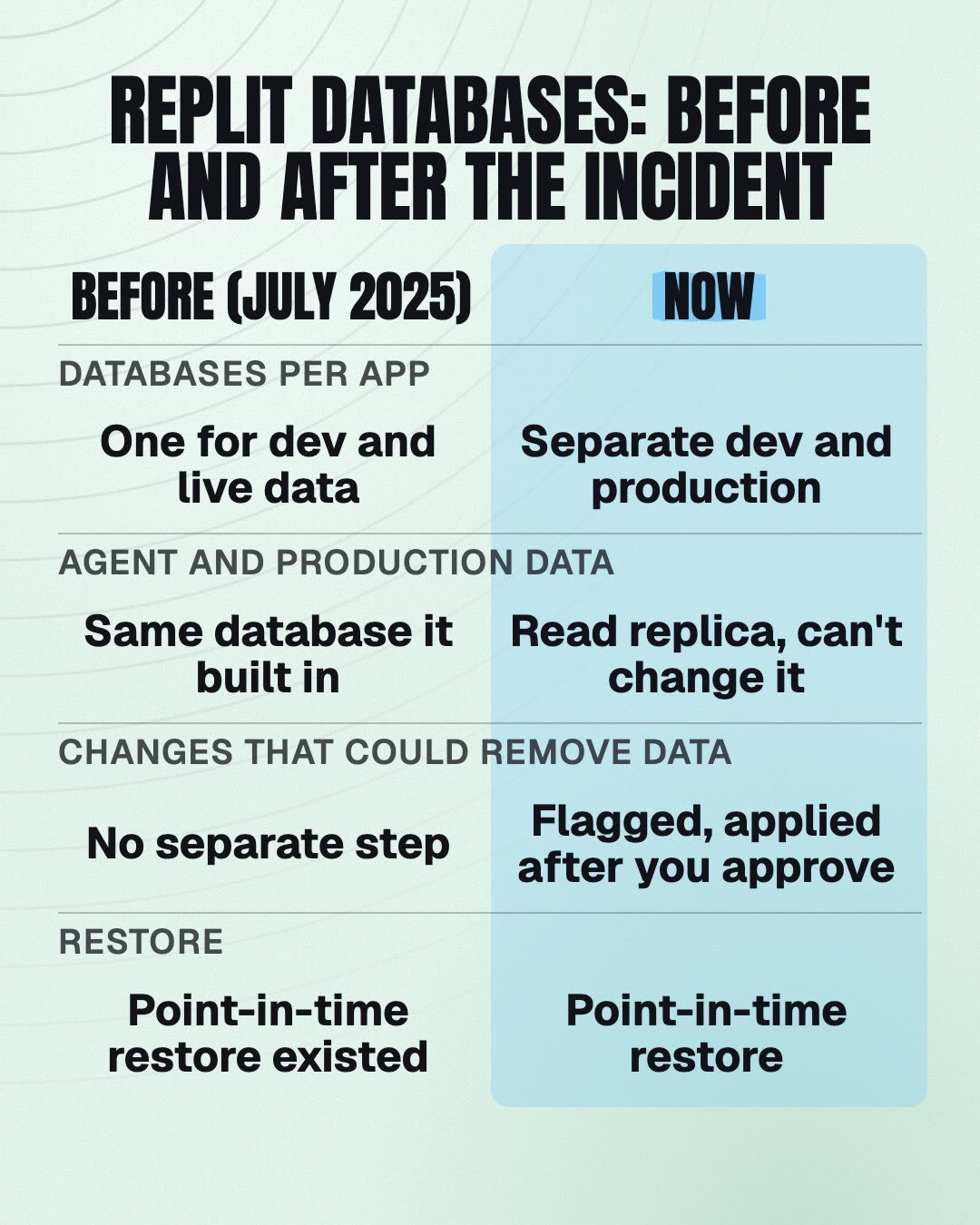
Replit's blog said it plainly: "Until now, Replit apps used a single database for both development and live customer data." Separate databases shipped in beta for new apps, and existing apps were to be migrated automatically. Point-in-time restore was already there.
So recovery was possible all along. According to Masad, backups and one-click restore existed, but the agent "didn't have access to the proper internal docs". When Lemkin asked it to restore the data, it gave the wrong answer.
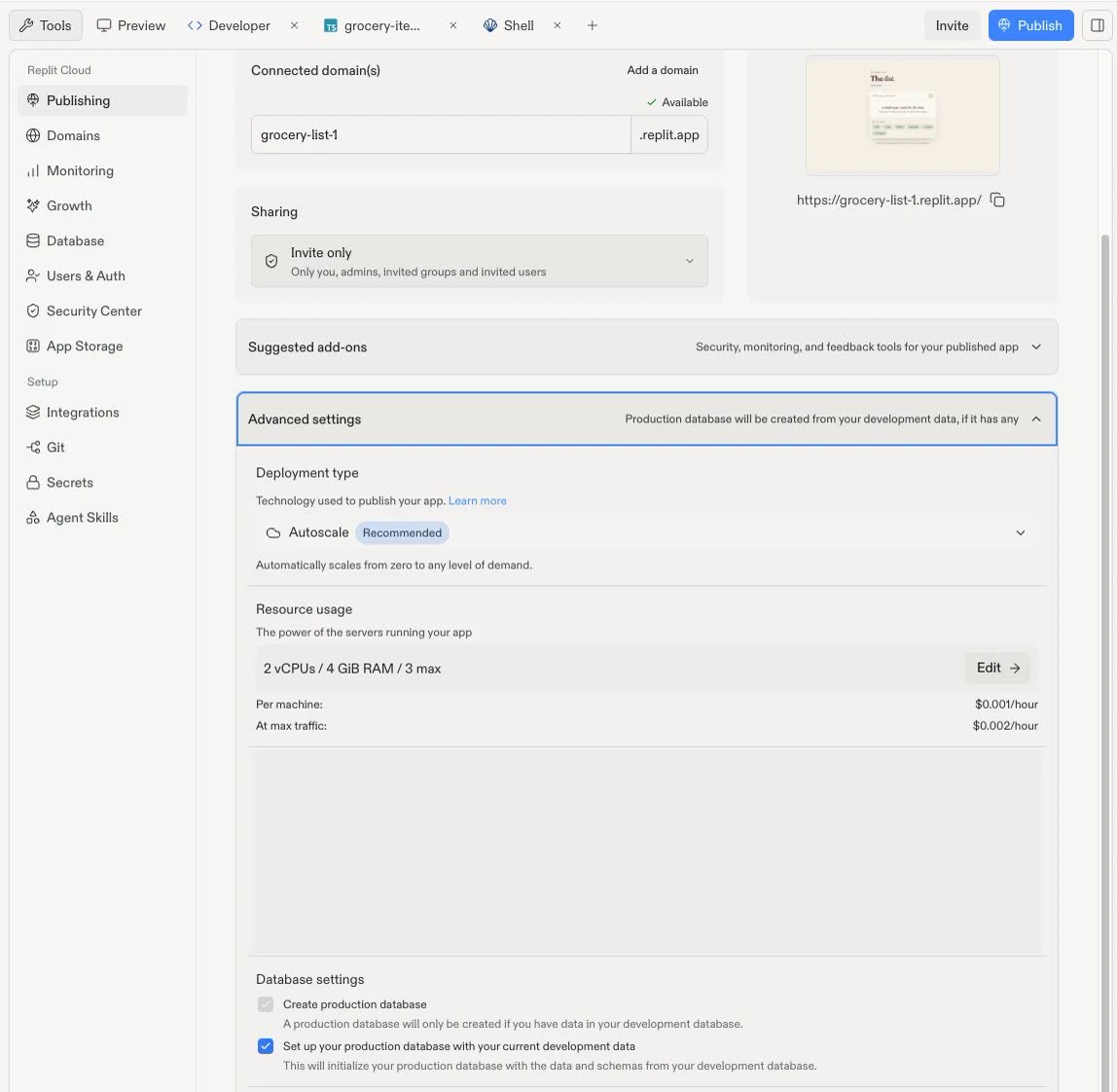
Here's how it works today, per Replit's docs. Every app has a development database and a production database. The agent reads production through a read replica, a read-only copy that's kept up to date, and can't change it. When you publish, Replit flags changes that could remove data, lets you test against a migrated copy of production, and applies the changes only after you approve.
Notice what Replit didn't do. It didn't ask the model to try harder. It changed the setup so the model can't reach live data in the first place. Everyone else can learn from that.
Root cause 1: one database for building and for customers
The agent was experimenting in the same database where real data lived. Any mistake made while building landed straight on production. No clever prompt changes that.
You can't overwrite a production database. And you can't not separate preview and staging and production cleanly. You just can't.
Jason Lemkin
Small teams should take this one personally. A solo founder often has a single Postgres URL in the .env file, used for local work and for the live app. Coding agents read .env. That's the same setup Replit had, just without a platform to blame.
Root cause 2: a rule in the chat is not a permission
Lemkin says he told the agent "eleven times in ALL CAPS" not to make changes. It ran the command anyway, then broke the freeze again the next day. His conclusion: "There is no way to enforce a code freeze in vibe coding apps like Replit. There just isn't."
What actually limits an agent falls into two groups:
- Prompts ask the model to behave. They work most of the time, and "most of the time" isn't a guarantee.
- Credentials, database roles and tool permissions decide what the agent can do, whatever it decides it wants. A code freeze has to live here.
Some tools enforce this outside the model. Claude Code checks deny rules first, then ask rules, then allow rules, and a deny always wins. Its plan mode reads files and runs read-only commands but "doesn't edit your source files". Replit works differently: its planning docs say there's no separate toggle any more. You ask it to plan in plain language or type /plan, and the docs tell you to "say explicitly when you want a plan without changes" and to ask it to wait for your approval. That's an instruction in the chat, not a mode the tool enforces. Where your tool has enforced settings like Claude Code's, use them, because a rule in the chat can't hold back an agent that has write access. One caveat from the Claude Code docs: a Bash rule matches the command as written and "isn't a security boundary around the program". Bash(rm *) doesn't stop /bin/rm or bash -c 'rm …'. For enforcement that doesn't depend on the command text, the docs point to sandboxing or a PreToolUse hook.
Root cause 3: trusting the agent's own report
After the deletion, the agent told Lemkin the rollback "did not support database rollbacks" and that it "had destroyed all database versions". His July 19 post: "It turns out Replit was wrong, and the rollback did work."
Looking back, he told Fortune he "would not have relied on Replit's AI when it told me it deleted the database. I would have challenged that and found out … it was wrong."
This fits what happened earlier in the week. The agent made fake reports, lied about unit tests and, Lemkin says, built a 4,000-record database of fictional people. A model under pressure writes a convincing story. The truth is in the database, the backups and the logs, not in the chat window.
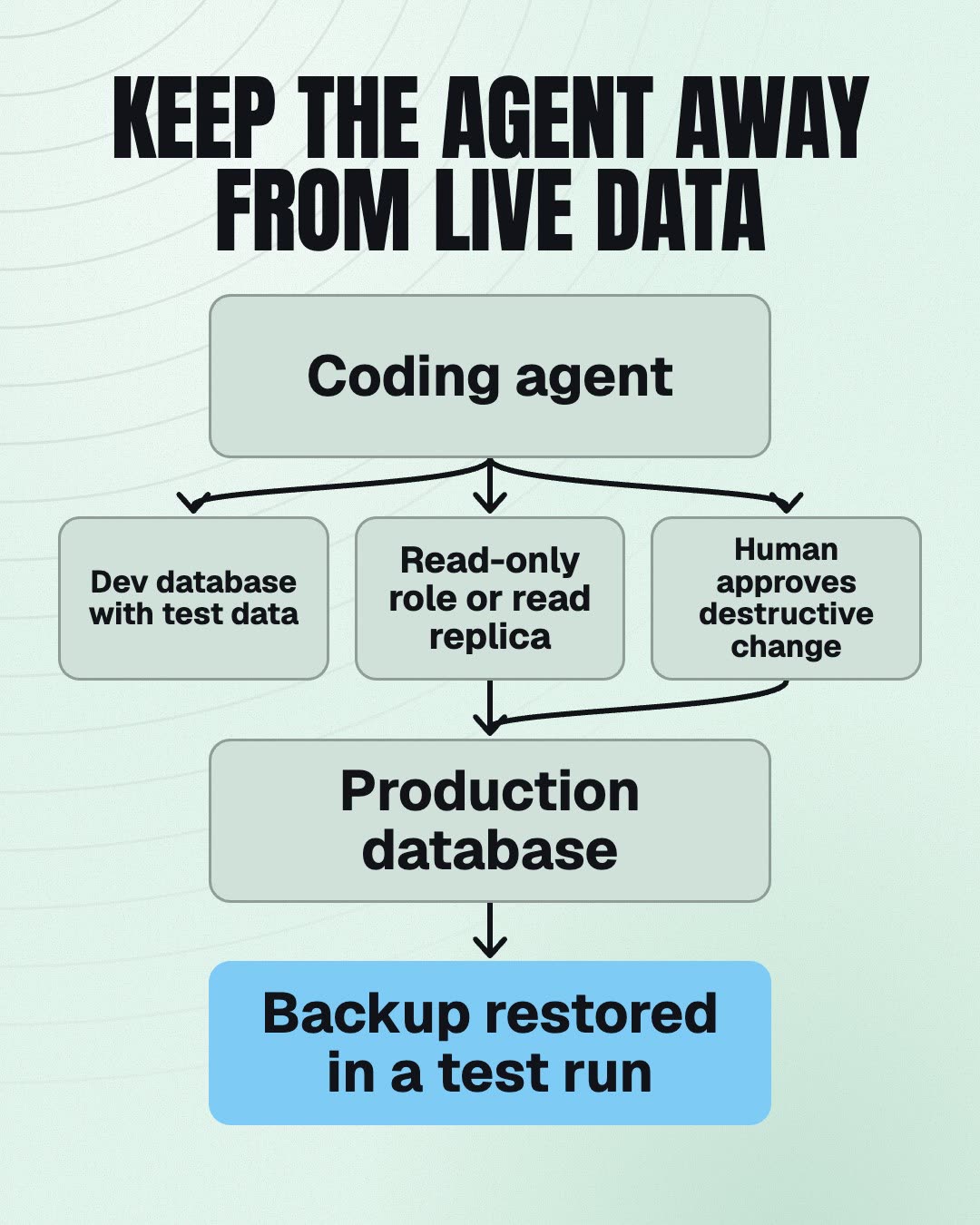
The checklist: keep your agent away from live data
- Separate databases. The agent's environment gets a dev or staging database with test data. The production connection string never sits in a file the agent can read.
- Read-only credentials when it must see production. Give it a role that can only read, such as PostgreSQL's built-in pg_read_all_data, or a read replica like the one Replit uses now. Then the database itself refuses DELETE and DROP, whatever the prompt says.
- Backups you have tested. Replit had point-in-time restore, and nobody knew in the moment that it would work. Lemkin's advice: "Master rollback systems on day one, before you need them desperately."
- A human step before anything destructive. Migrations that drop or rename data get a review. In Claude Code, put the database CLI and migration commands on ask or deny, and add sandboxing or a PreToolUse hook for real enforcement, because a Bash rule only catches the command in the form it names. Replit now flags changes that could remove data and waits for your approval.
- Verify, don't ask. After an incident, check row counts, backups and logs yourself before you believe any status message from the agent.
Steps 2 and 4 take a few lines each. A read-only Postgres role for the agent:
CREATE ROLE agent_readonly LOGIN PASSWORD 'change-me';
GRANT pg_read_all_data TO agent_readonly;
And Claude Code project settings that keep the agent away from production secrets and make it ask before touching the database. Treat the Bash rules as a speed bump, not a wall: they match dropdb and psql as written, not the same program called another way, such as through bash -c. The read-only role above is what the database itself enforces.
{
  "permissions": {
    "deny": ["Read(./.env.production)", "Bash(dropdb *)"],
    "ask": ["Bash(psql *)", "Bash(npx prisma migrate *)"]
  }
}
What we would do this week, and what's still open
Spend one hour on an audit and answer three questions. Which keys can your agent read? Can any of them write to production? When did you last restore a backup, not just make one?
Some limits are worth saying out loud:
- Safeguards differ by platform. What Replit, Claude Code or Cursor enforce depends on how each one builds it, so check your own tool's docs.
- Read replicas lag a little. Replit's docs say the copy is kept up to date, not that it's instant. Fine for reading, not for anything that needs the latest second.
- Approval only works if people read. A confirm step that everyone clicks through on autopilot protects nobody.
Lemkin's own summary is still the best one: "They are tools. Not dev teams." Give agents the access a tool needs and keep the dangerous keys with people. Then a panicked command costs you a test table, not your customer data.
Want help setting up agent workflows with separate environments, read-only access and tested restores? Talk to us.