
Someone fills in your contact form at 9 p.m. and you reply at 10 a.m. That's about 13 hours. Going by the published studies, that's still faster than most companies manage. The trouble is that by morning, the visitor may already have booked with someone who answered.
You have three practical ways to cover the evening. You can keep the form and reply the next day, pay a live-chat service staffed by real people, or add an AI chat widget that answers from your own pages. We priced each one per 100 conversations using the vendors' own pages, and we looked at what goes wrong with each.
The 9 p.m. lead problem, in numbers
The famous five-minute figures come from the 2007 Lead Response Management study by Dr. James Oldroyd at MIT, run with InsideSales.com (AINORA traces the source). Calling a lead within 5 minutes instead of 30 made reaching them 100 times more likely and qualifying them 21 times more likely. People often credit these numbers to Harvard, but they don't come from Harvard.
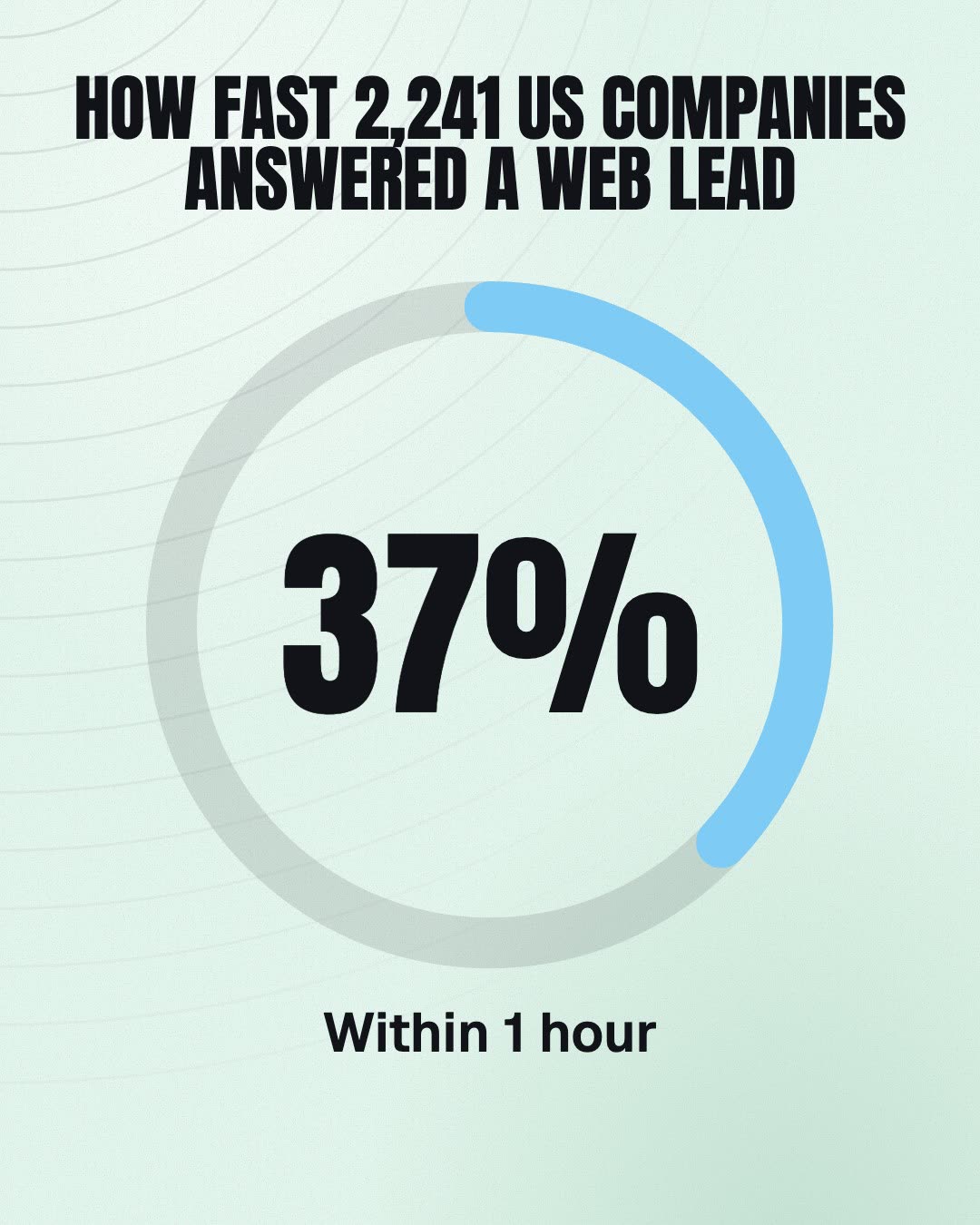
Harvard Business Review did publish its own audit, The Short Life of Online Sales Leads, in 2011. It tracked how quickly 2,241 US companies answered a web lead:
- 37% replied within an hour
- 16% replied within 1–24 hours
- 24% took more than 24 hours
- 23% never replied at all
Among the companies that did reply, the first answer took 42 hours on average. Firms that tried to reach a prospect within an hour were nearly 7 times as likely to qualify the lead as firms that waited one hour longer. They were more than 60 times as likely as firms that waited 24 hours or more.
Newer tests show the gap hasn't closed. In September 2026, Clay tested 6,346 demo and contact forms and found that two-thirds of the companies never replied.
Option 1: a contact form and a reply the next day
The form sends an email and someone answers it in the morning. You need no new software, and your site probably has this already.
The cost doesn't show up on an invoice. It's the leads that go cold overnight, plus the staff time spent answering them. For scale, Tidio's savings calculator assumes a US support rep on a $42,000 salary costs $6.73 per conversation (via CostBench). That's a vendor's benchmark, not a measured fact, but it shows that answering 100 enquiries isn't free either.
There's a cheap upgrade that needs no chat at all. For after-hours leads, Kixie suggests an instant automated text that confirms the request and sets clear expectations. A message like "Got it, we'll call you at 9 a.m." keeps the lead warm and costs almost nothing.
When it wins: you get few leads, your sales cycles are long, or your questions always need a person (quotes, site visits, legal or medical questions). It also works for a team that can promise a reply first thing in the morning and keep that promise.
Option 2: an outsourced live-chat service with real people
Smith.ai is one service that publishes its prices for live-staffed web chat, with agents available around the clock. These prices come from its own page:
- Pay-as-you-go: $10 per chat
- Starter: $140 a month for 20 chats ($7 per extra chat)
- Basic: $300 a month for 50 chats ($6 per extra chat)
- Pro: $600 a month for 120 chats ($5 per extra chat)
- Appointment booking: $1.00 extra per chat
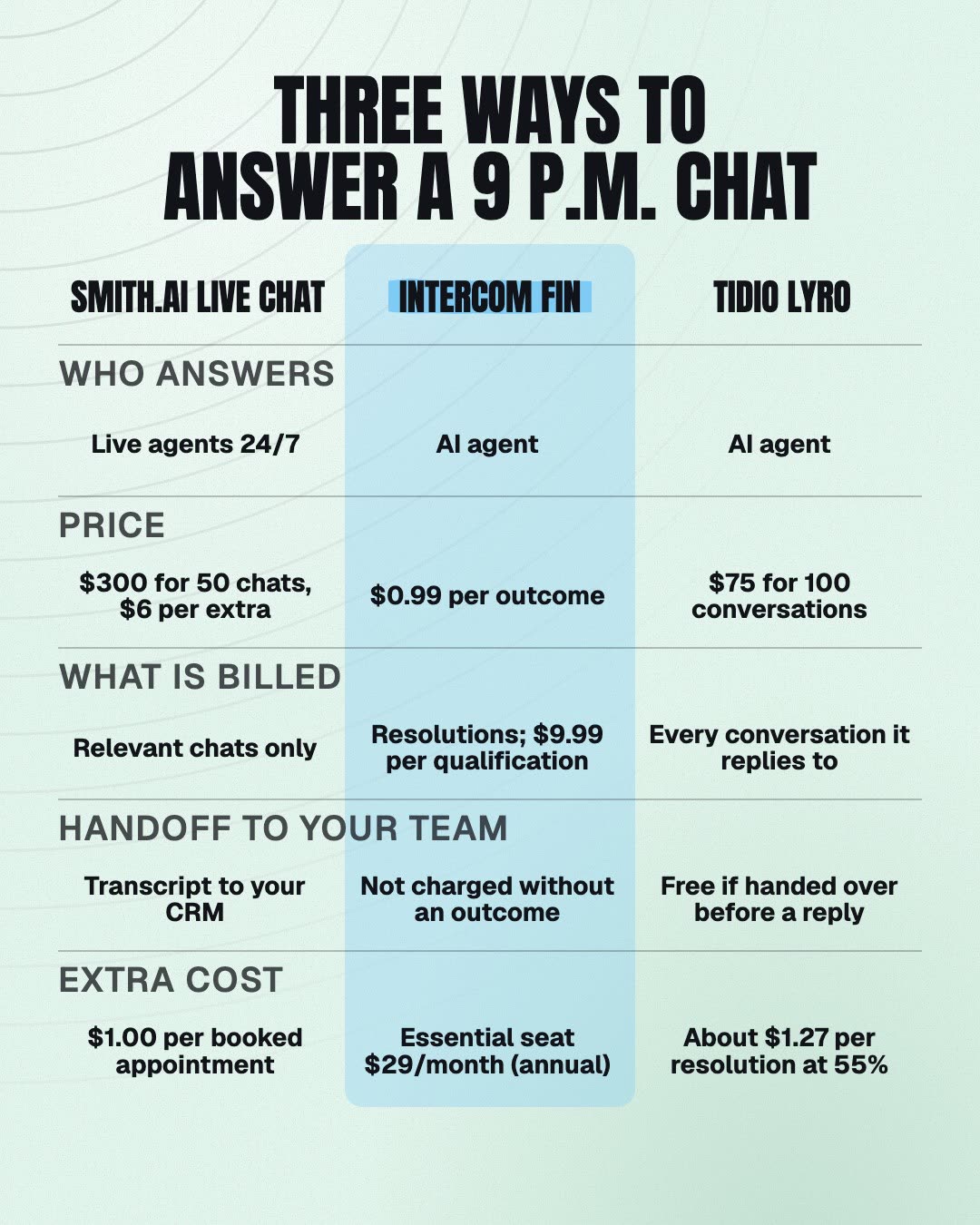
By our arithmetic, 100 chats a month cost about $600 on Basic ($300 plus 50 extra chats at $6). That's the same as Pro, which includes 120 chats. Pay-as-you-go would come to $1,000.
You're billed only for relevant chats, meaning ones where the agent collected a name and email and worked out what the visitor wanted. Spam, tests and random "hello" messages are free. Its AI reads your website's content, and the agents follow a playbook you write together. A person qualifies the lead and books the call, and the transcript goes into your CRM.
When it wins: each lead is worth hundreds of dollars or more (law, home services, clinics, B2B services), the questions are messy, and losing one good lead costs more than the monthly fee.
Option 3: an AI chat widget trained on your site
Intercom Fin: $0.99 per resolved chat
Fin charges $0.99 per outcome. A chat counts as resolved when the customer asks for no more help after Fin's last answer. You pay nothing when Fin passes a conversation to your team without an outcome, or when the customer asks for a human (Intercom's pricing guide). So 100 resolved chats cost about $99, plus at least one Essential seat at $29 a month on annual billing ($39 if you pay monthly).
Tidio Lyro: billed per conversation
Lyro bills every conversation it replies to, whether or not it solves the problem. CostBench read Tidio's rate card in August 2026. It found $75 for 100 Lyro conversations a month, with the rate settling at $0.70 per conversation from 200 a month up.
Compare the price per resolution, not per conversation. Using the 55% resolution rate from Tidio's own calculator, CostBench works out about $1.27 per resolution, slightly more than Fin's $0.99. On the other hand, Tidio's paid plans cost less to run with human agents.
- A Tidio thread closes after 15 minutes of silence, so a visitor who comes back later is counted twice.
- If Lyro hands a chat over without replying, it isn't counted.
- Tidio's pricing page now shows a Starter plan at $33 a month, billed annually ($390 a year), for 50 AI and human conversations. Prices change, so check the vendor's own slider on the day you buy.
You can set up either one without code. Tidio can learn from your FAQ and scrape your website. Intercom offers a 14-day free trial with unlimited Fin outcomes and no credit card. Tidio's paid plans come with a 7-day trial.
What goes wrong: invented answers and a bad handoff
The best-known case is Air Canada. Its website chatbot told a grieving customer they could claim a bereavement fare after travelling, but the airline's own policy page said the opposite. In 2024 the BC Civil Resolution Tribunal held Air Canada responsible and ordered it to pay $812 (CBC).
It should be obvious to Air Canada that it is responsible for all the information on its website. It makes no difference whether the information comes from a static page or a chatbot.
BC Civil Resolution Tribunal, 2024
The lesson: whatever the widget says, your business said it. For a small business, the risk is a bot that makes up a price, opening hours, a discount or a refund promise. Keep prices, guarantees and policies on a few clear pages, and tell the bot to answer only from those pages.
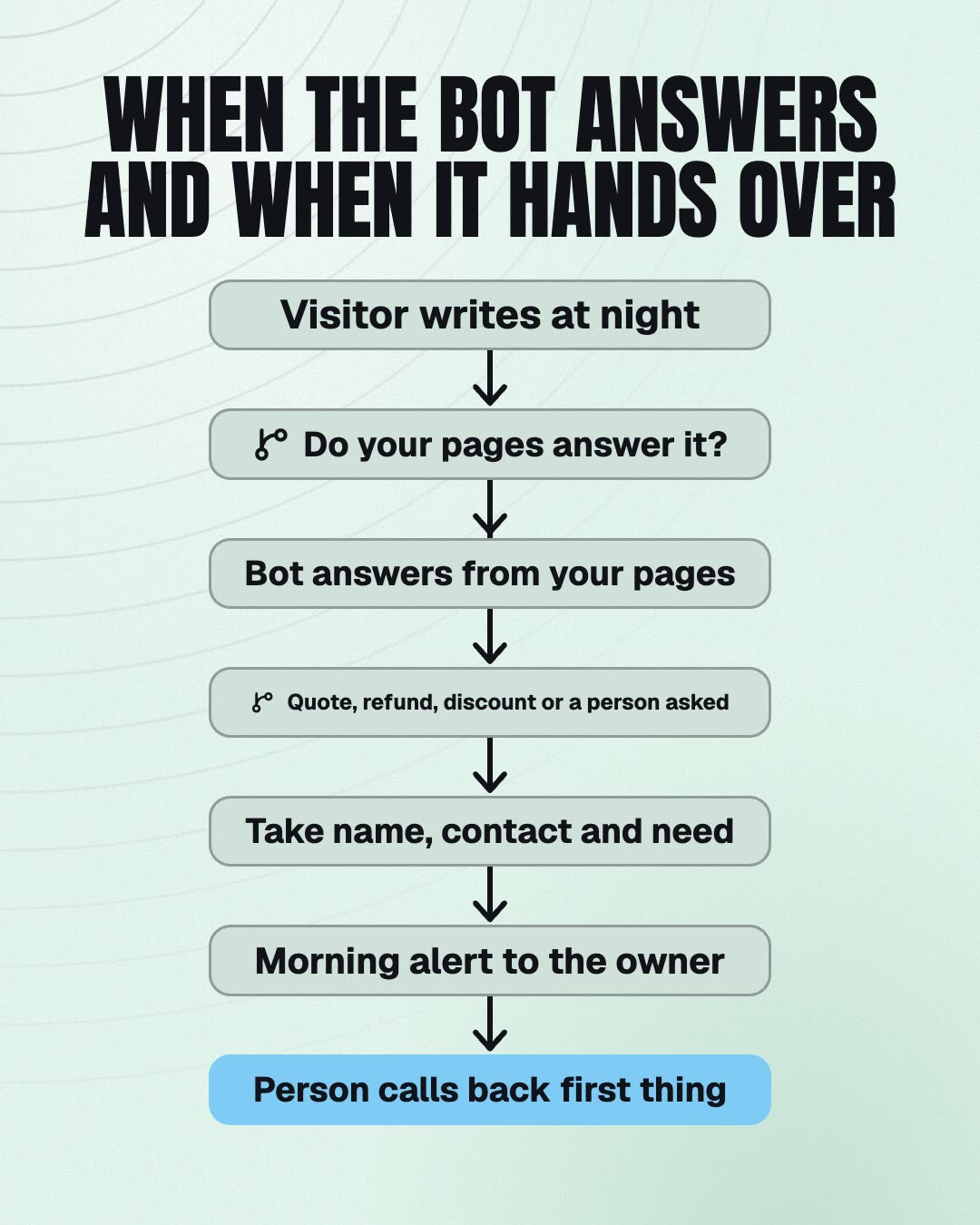
The second risk is a bad handoff. At night there's nobody to hand over to. So the bot has to say clearly that a person will reply in the morning, and it has to take a name, email or phone number. It shouldn't stall or guess.
The third risk is the bill. Per-conversation meters and automatic upgrades add up, and CostBench notes that Tidio's auto-upgrades move your tier up but don't reliably move it back down. Set spending limits. Intercom, for example, offers usage alerts and hard limits that pause Fin and send chats to your team.
A simple rule for when the bot hands over to a person
You can write this rule into any widget's instructions in plain words:
- Answer only from your own pages: hours, services, starting prices, area served and how booking works.
- Hand over, or take contact details for the morning, when someone asks for a quote, a discount, a refund or an exception, or about anything to do with health, law or money. Do the same when the visitor asks for a person, sounds frustrated, or asks something your pages don't answer.
- Catch hot leads. For someone ready to book or buy, collect their name, contact, need and a good time to call. Then alert the owner by email or text so that call is the first job of the morning.
- Review transcripts weekly. Turn every question the bot couldn't answer into a line on your FAQ page. Over time, that's how the bot resolves more questions.
Which option wins, and what we would set up
Here's what 100 conversations a month cost, from the vendors' own price lists (for Tidio, CostBench's August 2026 reading):
- Contact form: about $0 in software. Nobody answers at 9 p.m. You pay in staff time and in leads that go cold.
- Smith.ai staffed chat: about $600 on Basic. A person answers, and you're billed per relevant chat.
- Intercom Fin: about $99 plus a $29 seat. The AI answers, and you're billed per resolution ($9.99 per qualification).
- Tidio Lyro: about $75, by CostBench's August 2026 reading. The AI answers, and you're billed per conversation it replies to. Tidio now prices combined AI and human quotas, so check its slider for today's price.
Use the form alone if leads are rare and you can reply before 9 a.m. without fail. Choose a staffed service if a single lead is worth more than a month of fees and every enquiry needs a human conversation. Choose an AI widget if most evening questions repeat (prices, hours, availability, shipping) and you want a reply within seconds for around $100 a month.
For a typical small business, here's what we'd set up: an AI widget that answers only from the site's pages, the handoff rule above, an instant "we'll call you at 9" confirmation, and a morning alert with the night's leads. Start with a free trial for two weeks, then compare how many after-hours leads you captured before and after. This is our recommendation, not a client result.
In short, the free option often costs the most, because that's where the night's leads go quiet. If you'd like a widget like this set up with the handoff rule and connected to your CRM, work with us.